TRADEFROMCHART GUIDES

TFC Drawings

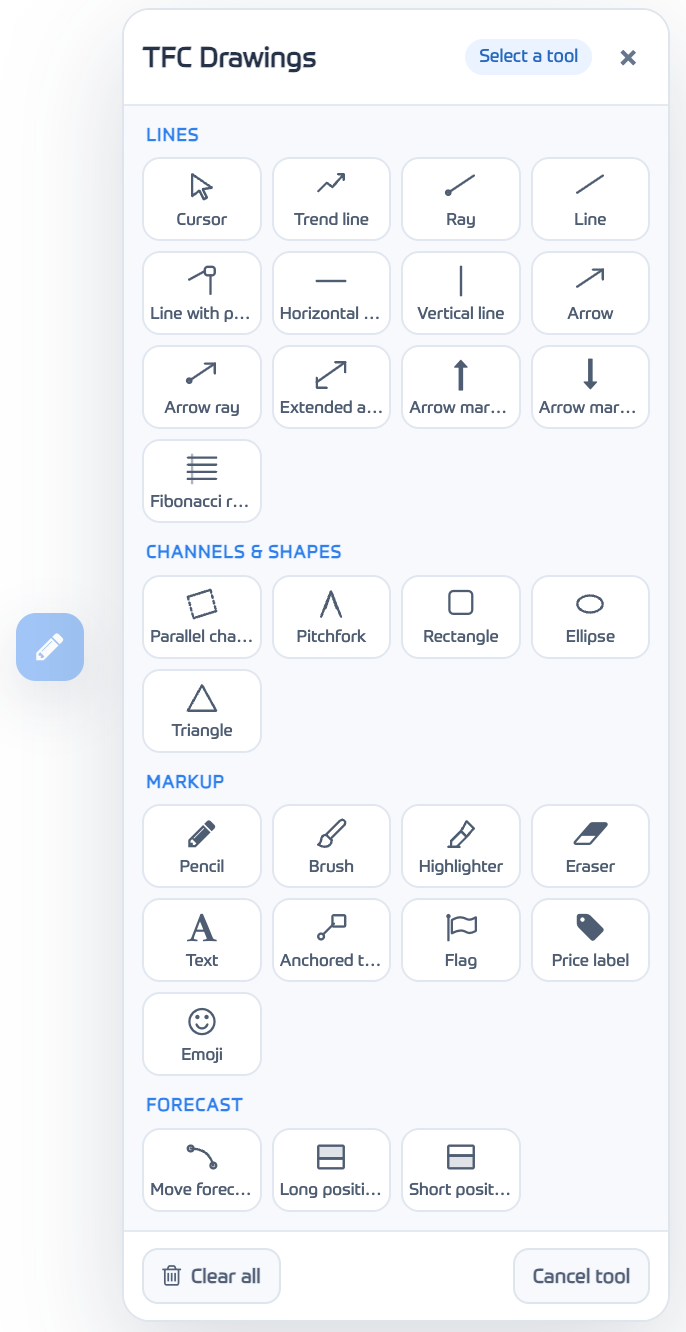
TFC Custom Chart Drawings

TFC now includes its own collection of custom chart drawing and annotation tools, providing an alternative to the standard ChartIQ drawing tools.

Our collection will continue to grow, with new drawings and features added in future updates.

Have a suggestion? If there’s a specific drawing tool or annotation you’d like to see in TFC, we’d love to hear from you! Share your ideas with us through our Telegram support channel: @tfc_support_chat.
drawings

Last published 24 November 2026
© 2026 TradeFromChart Made for traders, by traders.
Introduction

Welcome to TradeFromChart (TFC)Trade smarter. Manage everything directly from your chart.TradeFromChart (TFC) brings a new approach to tradi…

Download

You can download the latest version (1.7.50) for Made4Trading:https://cdn.tradefromchart.com/TFC_v1.7.50_24.11.26_M4T.zipFor TradeNation, do…

How to Install

Browser Compatibility: TFC is officially supported on Google Chrome and Microsoft Edge. Other Chromium-based browsers, such as Brave, may al…

How To Load

After you install the software, login to made4trading, load the platform and open a chart by clicking the chart icon:Chart Toolbar & Control…

Toolbar

The TFC ToolbarThe TFC Toolbar is your main control centre and the gateway to TradeFromChart’s trading features. It provides quick access to…

Settings Window

TFC SettingsThe Settings window allows you to customise TradeFromChart to suit your trading style and personal preferences.Settings are orga…

Positions Window

This window shows your current positions and orders list, showing your position and order attributesThe position tab also includes these opt…

Price Alerts

Allows you to add price alerts that trigger a sound notification or a Toast notifcation when price level is hit.Client-side alerts are only …

Transactions Window

The transactions window shows your transactions from today, yesterday or last 7 trading days, a Statistics tab showing number of trades, tot…

Market Explorer

The market explorer window shows a list of popular markets and a dropdown choice of your own custom watchlists, allowing you a quick view in…

Economic Calendar

View current economic events that may affect the markets by using the Economic Calendar. Filter by today, tomorrow and weekly events. There …

Trading Signals Window

Trading SignalsThe TFC Trading Signals window gives you access to a selection of mechanical, algorithm-driven trading signals developed by T…

TFC Drawings | TradeFromChart Docs